
Journey To ChinaLast updated
What WeChat is
WeChat is Tencent's messaging and everyday-services app. Chat, voice calls and video calls form its core. Official Accounts, Mini Programs and Weixin Pay connect restaurants, hotels, drivers, ticketing services and merchants inside the same app.
Several names appear in English-language advice, and they are not interchangeable:
- WeChat is the app international visitors normally download from an overseas app store.
- Weixin is the name Tencent uses for the service aimed at mainland Chinese users. WeChat and Weixin interoperate, although their terms, privacy policies and some features differ.
- Weixin Pay, also labelled WeChat Pay, Pay and Services or Wallet in some versions, is the payment service inside WeChat.
- Mini Programs are services that run inside WeChat without a separate installation. Ride-hailing, attraction reservations, restaurant queues and tickets may all use them, but each provider remains responsible for its orders and support.
- Official Accounts belong to institutions or businesses. Museums and attractions often place their booking entrance in an Official Account menu.
Weixin Pay is not a separate app. The desktop and web versions also cannot replace the phone app for initial registration, identity checks or in-person QR payments.
WeChat is useful, but it should not be your only travel tool. Keep at least one fallback: some cash, a physical card or another mobile-payment app.
Where visitors use WeChat in China
Messaging local contacts
Hotel staff, guesthouse hosts, guides, drivers and restaurant staff may ask to add you on WeChat. Contacts can exchange text, voice messages, photos, files and locations. Pressing and holding a chat message may offer a translation, which is useful for addresses and simple arrangements. Confirm refunds, passport names, meeting times and prices in a short written message as well.
Scanning a personal QR code is the usual way to add someone. Tap +, choose Scan, then point the camera at the other person's code. You can also search a WeChat ID or phone number under Contacts. A personal contact code and a merchant payment code may look similar, but they do very different things. Check who you are adding, especially when an unknown account claims to be customer service or a ticket agent.
Paying merchants
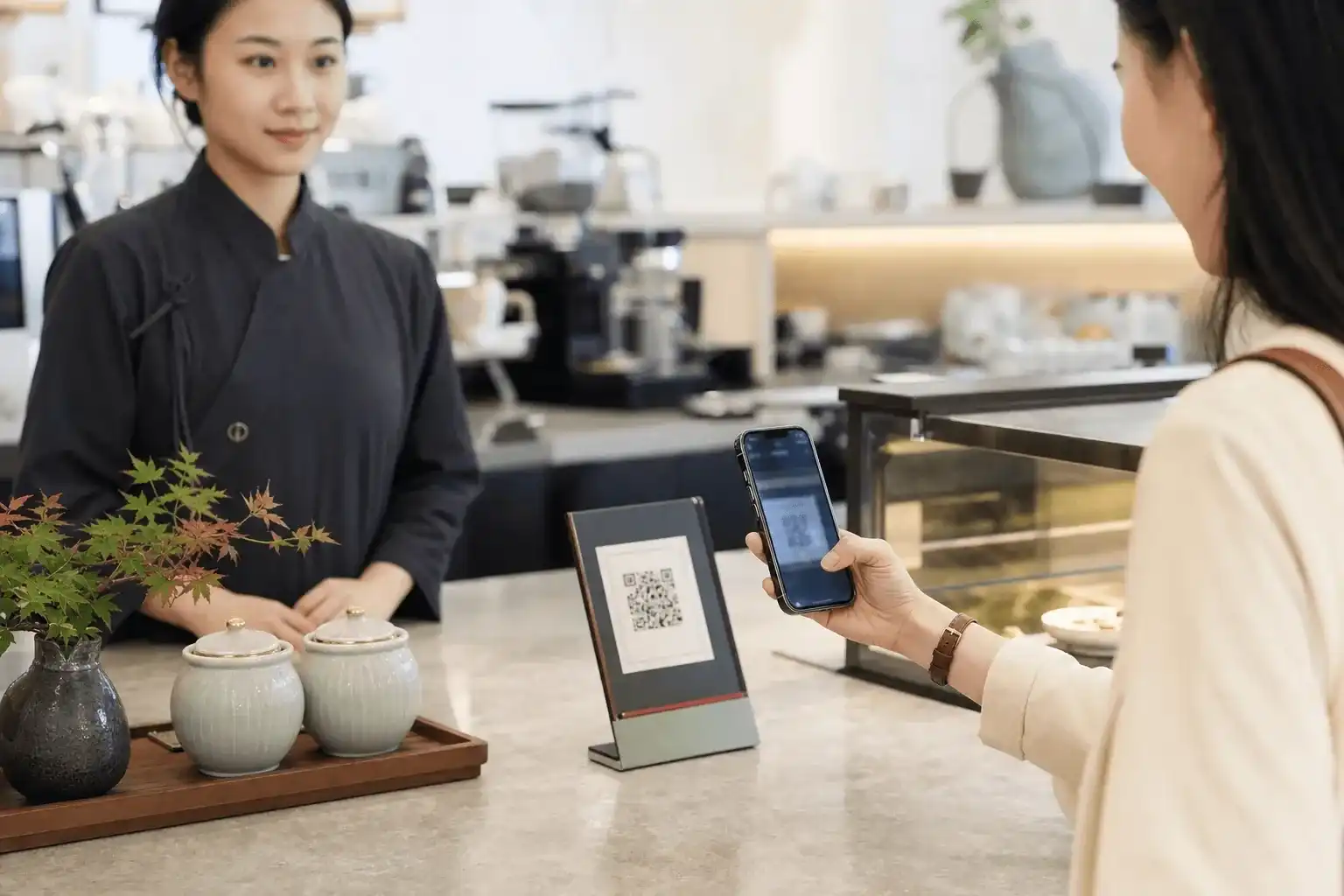
After enabling Weixin Pay and linking an eligible international card, you can scan a merchant's collection code or show your own changing payment code to the cashier. Restaurants, convenience stores, shopping centres, hotels, attractions and many taxis accept one of these methods.
International cards are intended for everyday purchases in mainland China. Red packets, person-to-person transfers, balance top-ups and some financial services are normally unavailable. Being able to pay a restaurant does not mean that you can transfer money to an individual seller.
Ride-hailing Mini Programs
Search WeChat for a provider such as DiDi, grant location access, enter the pickup point and destination, then choose a vehicle type. Airports, railway stations and large shopping centres often have dedicated ride-hailing zones. The phone's map pin may not be where a driver is allowed to stop. See the ride-hailing guide for the full booking flow and other app entry points.
Check the number plate, car model and driver details before boarding. Use in-app messages or the protected phone number when possible, and never send a driver a passport photo. The fare is usually settled through Weixin Pay after the ride; waiting charges, tolls and cancellation fees follow the order screen.
Attraction and museum reservations
Many attractions put reservations in an official Mini Program or Official Account. Search the full Chinese name of the attraction, then check the verified account owner and institution name before submitting passport details.
A reservation may require a date, time slot, passport name, document number and nationality. A successful reservation, successful payment and issued ticket can be three separate states. Reopen the original order before travelling and check whether entry uses a QR code, booking number or the original passport. Refunds must also be handled through the channel that issued the order.
Restaurants, hotels and other services
Restaurants use Mini Programs for queues and ordering. Hotels may place bookings, membership and support inside an Official Account. Flights, food delivery, bike hire and city services can also appear in WeChat.
These services are not necessarily operated by Tencent. When something goes wrong, check the merchant name, service terms and support number in the order. Weixin Pay records how you paid; it does not replace the airline, attraction or hotel responsible for fulfilment.
Where to download WeChat
| Platform | Official source | What to check |
|---|---|---|
| iPhone / iPad | WeChat on the Apple App Store | The App ID is 414478124; regional stores may redirect to a local listing. |
| Android | WeChat on Google Play | The package name is com.tencent.mm, with WECHAT INTERNATIONAL PTE. LTD. shown in the developer information. |
| Web | Official WeChat website | It links to official downloads and desktop software. Registration, payment setup and in-person scanning still need the phone app. |
If WeChat is missing from your app store, first check the store region, operating-system version and age settings. Do not download an APK from a forum, file-sharing service or message, and avoid lookalike “enhanced international” editions.
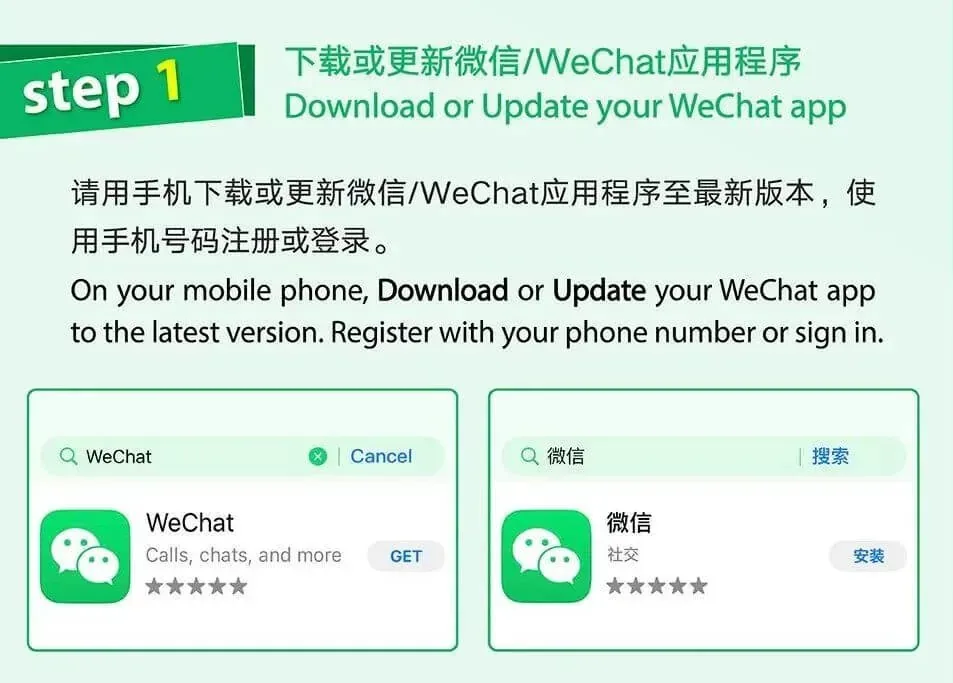
Store ratings, buttons and page layouts vary by country and change over time.
Registering as an international visitor
1. Use a phone number you will keep
- Open WeChat and choose Sign Up.
- Select the correct country or region code and enter a number that can receive SMS messages.
- Add a display name, set a password and read the terms and privacy information shown on screen.
- Complete the SMS code, security check or any other step requested by the app.
- After registration, check language, account security and the linked number under Settings.
An overseas number can be used; a mainland Chinese +86 number is not required. A data-only travel eSIM usually cannot receive the necessary code. Use your own long-term number rather than one borrowed from a hotel, guide or temporary verification service, as you may need it again to sign in or manage a refund.
2. If the app asks for help from an existing user
WeChat's risk controls sometimes ask an existing user to assist with registration, but this is not a fixed step for every visitor. It may depend on the phone number, device, network and registration pattern.
If the request appears inside the official app, ask someone you know who meets the conditions shown on screen. Do not pay strangers online for “verification”, and never give them your password, SMS code or passport image. If nobody can help, use the Help option in the registration flow or official WeChat support.
3. Let a new account settle
Finish the profile and account-security settings before gradually adding people you know. Adding many contacts, joining unknown groups, scanning untrusted codes or switching devices repeatedly can trigger another security check.
Before departure, add a travelling companion and test messages, voice calls and location sharing. For payments, a small purchase on a stable connection after arrival is a more meaningful test than trying to simulate a mainland merchant transaction from abroad.
Linking an international card to Weixin Pay
Find the payment menu
The usual path is Me > Services > Wallet. Some English versions show Pay and Services; older versions may show Pay.
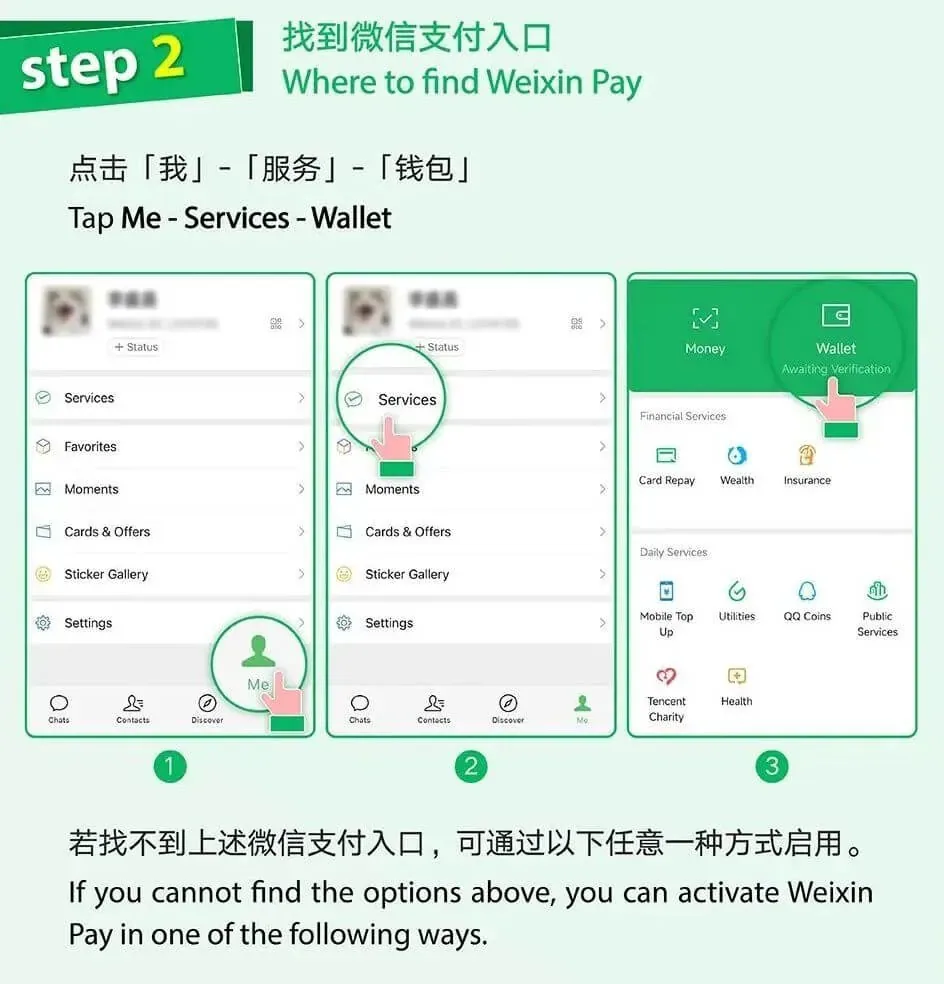
If Services does not appear, update the app and look under Me > Settings > General > Tools for Weixin Pay. Labels can change between versions, so avoid old “activation QR codes” copied from travel blogs.
What to prepare
- An overseas or mainland Chinese phone number that can receive SMS messages.
- A valid passport. Travellers from Hong Kong, Macao or Taiwan can select the document offered for their status.
- An eligible international credit or debit card.
- Access to the card issuer's SMS, banking app or 3-D Secure verification.
Tencent's 2025 visitor guide lists Visa, Mastercard, JCB, American Express, Discover Global Network including Diners Club, and UnionPay. Acceptance still depends on the card type, issuing country, bank and current product support.
Add the card
- Open Wallet and select Bank Cards or Add a Card.
- Read and accept the Weixin Pay service agreement and privacy policy shown in the app.
- Enter your name, country or region, document type, passport number and expiry date exactly as requested. Upload a clear passport data page or complete further verification if prompted.
- Enter the card number, expiry date, security code and any requested billing information.
- Complete the issuer's verification and set a Weixin Pay password. Do not reuse your phone unlock code or card PIN.
- Confirm that the card appears in Wallet, then try a small purchase.
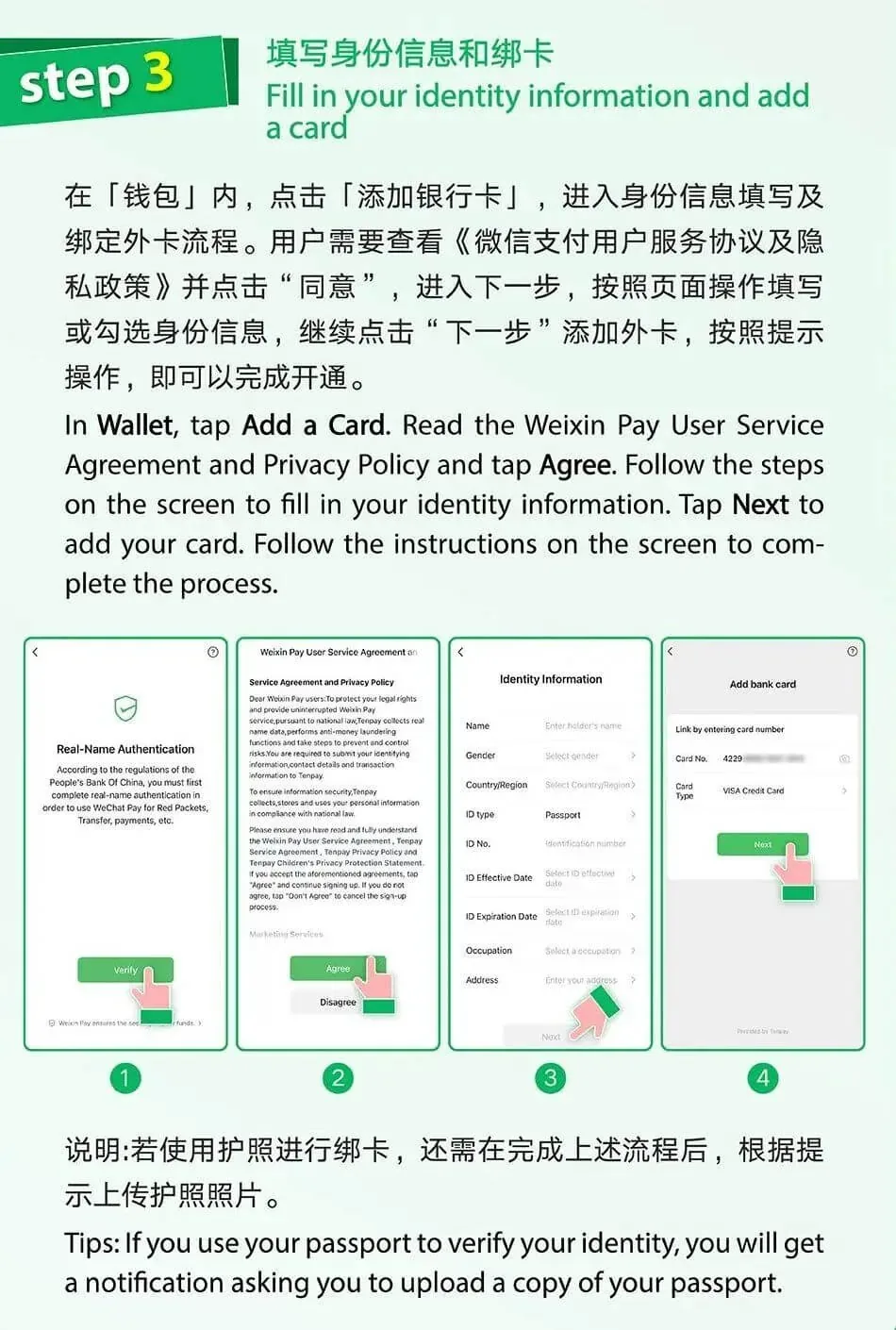
Avoid glare when photographing the passport and keep the portrait, machine-readable zone and all four corners visible. Follow the name fields on screen rather than deleting a middle name to force a match. After repeated failures, stop and check document validity, camera permission, network quality and messages from the card issuer.
What an international card can pay for
Tencent describes the supported scope as everyday consumption in mainland China, including food, transport, shops, supermarkets, attractions and hotels. A merchant can scan your payment code, you can scan a merchant code, or payment can be requested inside a Mini Program or app.
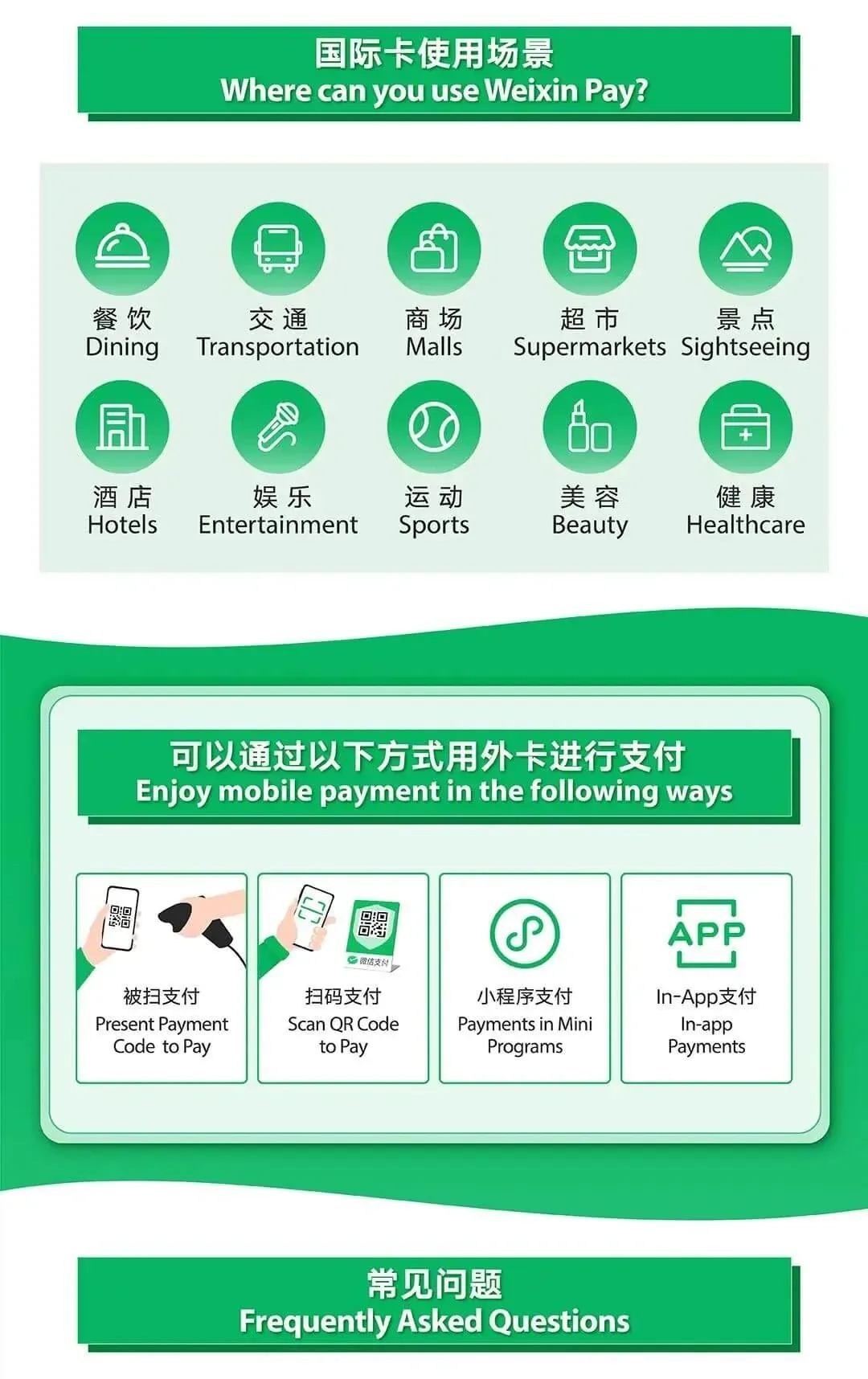
International cards generally cannot fund red packets, person-to-person transfers or the wallet balance. A particular merchant or Mini Program may also reject an international card. If that happens, use another legitimate payment method rather than sending money to a stranger who offers to pay for you.
Fees, exchange rates and limits
Dates matter here because older travel articles remain high in search results.
- Tencent's 2026 information says international-card transactions of RMB 200 or less are exempt from the Weixin Pay international-card service fee. A standard 3% fee may appear above RMB 200; the confirmation screen is authoritative.
- Tencent announced a limited promotion in May 2026. Until 31 December 2026, first-time users linking an international card may receive a waiver of the 3% fee on up to RMB 1,000 of payments per day for 90 consecutive calendar days from their first purchase. Check eligibility and remaining allowance in the app.
- Tencent said in 2024 that verified international users could have limits of up to USD 5,000 per transaction and USD 50,000 per year. “Up to” is not a guaranteed personal limit: verification status, the card issuer, merchant category and risk controls can all reduce it.
- The card network and issuer normally handle currency conversion. Your bank may still charge a foreign-transaction or conversion fee, so the final amount is the one on the card statement.
Do not rely on older RMB 6,000 single-transaction or monthly and annual figures as current universal rules. For a large hotel, retail or medical payment, read the phone confirmation and keep a physical card or second method ready.
Paying with WeChat
Scan a merchant code
- Tap
+and choose Scan. - Scan the code at the counter, on the bill or on the till display.
- Check the merchant name. If you must type the amount, confirm it with staff first.
- Choose the linked card and review the amount, any service fee and conversion notice.
- Enter the payment password or use biometrics, then wait for a clear success message.
Do not scan a “refund code” or “verification code” sent by a stranger. Genuine refunds normally return through the original payment route and do not require you to enter a payment password to collect them.
Show your payment code
- Open Services, then Money or the payment-code entrance.
- Confirm the funding card and current code.
- Let the cashier scan the changing code on your screen.
- Wait until WeChat and the bank notification clearly show the outcome.
A payment code is a short-lived credential. Do not screenshot or send it to anyone, and close it when you are not paying.
Pay inside a Mini Program
A Mini Program normally opens the Weixin Pay confirmation sheet after you submit an order. Check the merchant, order, amount and refund terms before choosing a card. Return to the Mini Program afterwards and verify the order status. This matters for rail tickets, attraction tickets and hotels: a successful charge does not always mean that the ticket or room has been issued.
Using Mini Programs more safely
- Pull down on the WeChat home screen to see recent Mini Programs, or use search.
- Enter the full institution or service name. Prefer a route linked from its official website, Official Account menu or sign at the venue.
- Check the Mini Program name, verified owner, terms and support details.
- Grant only permissions needed for the task. Contacts, precise location, photos and microphone access do not all need to be enabled at once.
- Keep the order in the Mini Program and the matching record in the Weixin Pay transaction history.
A third-party technology company may operate a legitimate attraction, hotel or restaurant Mini Program. The owner not matching the attraction name is not automatically proof of fraud, but you should be able to confirm the same entrance through an official channel.
For ride-hailing
- Find the ride-hailing pickup zone at airports and stations before setting the pin.
- Check both number plate and vehicle type before boarding.
- Keep destination changes and fare discussions in the Mini Program messages where possible.
- Review tolls, parking, discounts and cancellation charges on the final bill.
- For lost property, contact support from the original order; do not pay an unknown account a “recovery fee”.
For attraction reservations
- Copy the passport name and number exactly, and select Passport as the document type.
- Distinguish a free reservation from admission, guided-tour or package tickets.
- Check the date, entry slot, gate and refund deadline.
- Save the order number, but still carry the original passport used for booking.
- Use only the entrance confirmed by the attraction's website, Official Account or signs on site.
Troubleshooting
No registration code arrives
Recheck the country code, roaming and SMS reception, and temporarily disable message filtering. A data-only eSIM cannot receive the code. Repeatedly requesting another code in a short period can create a temporary restriction.
Registration asks for a friend's help
Make sure the request is inside the official app rather than a webpage or link from a stranger. If no eligible acquaintance is available, use the Help route shown on screen. Do not buy a verification service.
Services or Wallet is missing
Update WeChat, check the account region and language, then look under Me > Settings > General > Tools for Weixin Pay. If it remains unavailable, use official WeChat or Weixin Pay support rather than repeatedly reinstalling and creating more login checks.
A card cannot be linked
Check the banking app for an online, overseas or 3-D Secure approval. Confirm that the card is active and allows cross-border card-not-present transactions. If the issuer declined it, contact the bank first; if the bank received no request, contact Weixin Pay support.
Payment failed or the status is unclear
Do not immediately retry. Check Weixin Pay history, card notifications and the Mini Program order to see whether a charge already exists. For a duplicate charge, keep both order numbers, times and amounts before contacting the merchant and Weixin Pay.
A Mini Program is only in Chinese
WeChat can translate chat messages, but Mini Program translation is inconsistent. For passport details, dates, refunds and prices, take a screenshot and check it with a trusted translation tool. Use the provider's official English website or a staffed counter if the result is still unclear.
Contacting support
Tencent's current visitor-payment page lists these Weixin Pay numbers:
- From mainland China:
95017 - From outside mainland China:
+86 571 95017
Numbers can change, so confirm them in the Weixin Pay Help Centre or Tencent's visitor-payment page before calling. Login support and payment support are separate; explain whether the problem is registration, login, card linking or a transaction.
A short pre-departure check
- Install WeChat from an official app store and check the App ID or Android package name.
- Register with a phone number you will keep and that can receive SMS messages.
- Keep a valid passport ready, but never hand its image to an individual offering to “set up” the account.
- Link one travel card enabled for cross-border online payments, then make a small test purchase.
- Add a travelling companion or trusted contact and test messages and location sharing.
- Find the official reservation entrance for important attractions before arriving at the gate.
- Save hotel addresses, order numbers and emergency contacts for offline access.
- Carry cash, a physical card or another payment app as a fallback.
Official sources
- Tencent: Weixin and WeChat product overview, covering the relationship between WeChat, Weixin, messaging, Official Accounts, Mini Programs and payments.
- WeChat on the Apple App Store.
- WeChat on Google Play.
- Tencent: practical mobile-payment guide for visitors, including currently listed card networks and payment scenarios.
- Tencent: Easy Pay with Weixin Pay, including visitor payment guidance and support numbers.
- Tencent: 2026 inbound-payment update, describing the dates and daily allowance of the 90-day fee promotion.
- Chinese government: A Guide to Working and Living in China as Business Expatriates 2025, covering overseas phone registration, card linking and travel-payment basics.
- Beijing government: linking an overseas card to WeChat Pay, the source of the official instructional images used above.
Fees, limits, accepted cards and Mini Program services can change. Before linking a card, paying or submitting identity details, use the confirmation screen, current agreement and service provider's rules shown in WeChat.